How to Scale Payroll Services Without Losing Control
Growing payroll services while maintaining operational control
Successfully scaling payroll services requires more than adding staff. It requires a clear operational structure that allows payroll teams to manage increasing workloads while maintaining consistent delivery.
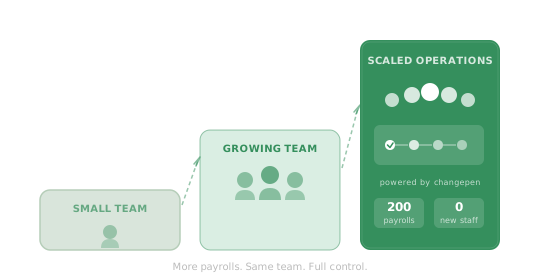
The Growth of Payroll Services
Growing client portfolios
Expanding payroll teams
Increasing operational demands
Need for structured processes
Operational Challenges When Scaling Payroll
As payroll services grow, the same operational pressures tend to emerge. More clients means more instructions, more changes, more client communication, and more coordination - all of it arriving within the same tight payroll deadlines.
Each client submits changes every cycle - starters, leavers, salary adjustments, statutory payment updates - all of which must be received, recorded and processed before payroll runs.
- New starter details
- Leaver notifications
- Salary adjustments
- Benefits and deduction changes
At volume, managing this without structured processes means relying on email threads, shared spreadsheets, and individuals who hold the knowledge in their heads. That is the ceiling most growing payroll services hit.
Coordinating Payroll Teams
As teams expand, new people need to be able to pick up work immediately - not spend weeks learning the informal habits of whoever they sit next to. Without defined workflows, knowledge stays locked in individuals, onboarding is slow, and cover during absence becomes a problem.
Structured workflows give every team member a clear process to work within, give leaders visibility of where things stand, and mean the service holds together even when people are unavailable.
Maintaining Consistency Across Payroll Services
When payroll teams operate across multiple offices, or manage different portfolios under the same service, inconsistencies in how work is handled accumulate over time. Different people capture changes differently. Different teams have different habits.
Standardising how payroll information is received, recorded and processed across every team removes that variability - and makes the service reliable regardless of which office is running it.
The Importance of Visibility in Scaled Payroll Services
At scale, payroll leaders cannot rely on asking around to understand how the service is running. They need to see it.
Which payrolls are on track. Which clients have not yet submitted. Which team members are carrying more than their share. Where a bottleneck is forming before it becomes a missed deadline. Without that visibility, the only way to get the picture is to interrupt people - which compounds the problem. Structured workflows make the operational state of the service visible in real time, without anyone needing to be asked.
Building the Operational Structure for Growth
The operational structure that supports scaling is not complex - but it has to be deliberate.
Defined workflows for how payroll information arrives, how changes are tracked, how teams coordinate, and how progress is visible - these are the foundations that let a payroll service grow without the operation becoming the bottleneck.
Where Changepen Supports Scalable Payroll Services
Changepen sits as the operational layer between clients and payroll software - managing the workflows, client communication, change capture and team coordination that payroll software does not handle.
Payroll software continues to run calculations and compliance. Changepen manages the structure around it that allows the service to scale.
Understanding the Operational Layer Around Payroll
For a full explanation of the operational layer around payroll, see Payroll Operations. For a closer look at how payroll workflows are structured and managed, see Managing Payroll Workflows.
Related Guides
If you are exploring how payroll services operate and scale, the following guides may also be helpful.
Payroll Operations
Understand the operational layer that supports payroll services and why it becomes critical as payroll client portfolios grow.
Read the guideManaging Payroll Workflows
Learn how payroll teams structure workflows to manage payroll changes, communication and team coordination.
Read the guideScaling Payroll Services
Explore how firms expand payroll services while maintaining operational consistency and visibility across payroll teams.
Read the guideWhich Payroll Environment Do You Operate In?
Payroll operations vary depending on the size and structure of the organisation delivering payroll services.
Explore how Changepen supports payroll operations in your environment.
Enterprise Accountancy Firms
Large accountancy firms delivering payroll across multiple offices, teams and client portfolios.
- Multiple payroll teams
- Regional offices
- Large payroll client portfolios
- Multiple payroll platforms
Growing Accountancy Firms
Accountancy firms expanding their payroll services and growing their payroll client portfolios.
- Expanding payroll client base
- Growing payroll teams
- Increasing client communication
- Need for clearer workflows
Payroll Bureaus
Specialist payroll providers delivering payroll services for large numbers of clients.
- High volume payroll clients
- Continuous payroll changes
- Client communication management
- Workflow coordination
Scaling payroll services: FAQ
How do you scale payroll services?
You scale payroll services by standardising operations so capacity is not tied to individual people: structured workflows, client portals and real-time visibility let you take on more clients without proportionally more staff. See payroll operations management.
Can you scale payroll without losing control?
Yes. A payroll operations platform gives the visibility and structure that keep quality, accuracy and control intact as volume grows, so scaling does not mean more risk.
How much can a payroll bureau scale with Changepen?
It varies by firm, but the pattern is consistent. One bureau, Cheney Payroll Services, took on 200 additional payrolls without adding staff after putting Changepen at the core of their operation.
Ready to transform your payroll operations?
Book a demo with the Changepen team to see how the platform can reduce admin, cut errors and strengthen your client relationships.
Speak to a payroll expert