Payroll Scheduling - Manage Cut-Offs, Cycles & Deadlines in One Place
Create complete payroll schedules in seconds with just one click, while gaining full visibility and control over your entire payroll operation.
Never Miss a Payroll Deadline Again
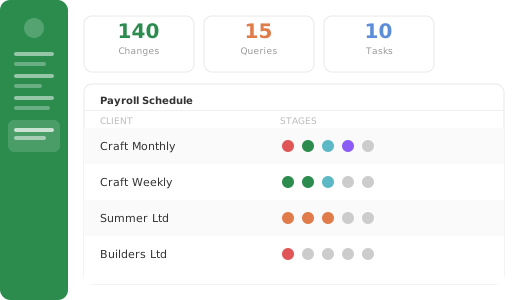
Let Changepen organise your working week by tracking all payroll and client deadlines, fully configurable to fit even the most complex setups.
Get a clear visual overview of what needs attention now - and what can wait - at payroll, client, or team level.
Intelligent schedules in seconds
Cut the admin time spent creating schedules by letting Changepen generate them automatically - individually or in bulk, at both customer and payroll levels.
Schedules adjust automatically for weekends and bank holidays, helping you plan confidently well in advance.
Keep Clients Informed and Payroll on Track
Keep your customers reassured by sharing payroll schedules transparently.
Overdue tasks are clearly highlighted, enabling your team to act proactively and prevent issues before they arise.
Gain Insights to Streamline Payroll Operations
Quickly identify patterns like late customer sign-offs, slow processes, and pay runs causing delays.
Use these insights to streamline your workflow, improve efficiency, and adjust your commercial approach where needed.
Our core features:

Powerful customer portals
Maintain a consistent customer experience at every stage of the payroll process.
Read More
Explore more great features:

Centralised Payroll Documentation
Document even the most complex payrolls in one structured, always-up-to-date place your whole team can trust.
Read more
All Contacts, One Place
Maintain a clean, current list of client contacts that your whole team can rely on.
Read more
Built to Work With You
Secure APIs connect Changepen to your existing payroll systems, so you can modernise without rebuilding your process.
Read more
Centralised Document Storage
Keep all payroll files in one secure place - no more email attachments or version mix-ups.
Read more
A Platform That Looks Like You
Style Changepen to reflect your brand - so clients feel like they’re engaging with your firm, not a third party.
Read more
Every Task. Every Owner. All in One Place.
Ditch external tools - track all payroll-related tasks with live updates, deadlines, and team visibility.
Read more
Know Your Clients Better
Access granular reporting to track effort, spot issues early, and plan for growth confidently.

Structured Teams, Flexible Roles
Create user profiles tailored to your team’s needs - securely hosted in the cloud for easy access anywhere.

Email That Works for Payroll Compliance
Embedded messaging keeps conversations organised, secure, and fully auditable.
Payroll scheduling: FAQ
What is payroll scheduling?
Payroll scheduling is the planning of each payroll around its pay cycle, cut-off dates and deadlines, so every payroll is started and completed on time. It is a core part of payroll operations management.
How does Changepen help meet payroll deadlines and cut-offs?
Changepen creates complete payroll schedules around your cut-offs and deadlines in seconds, then gives real-time visibility of what is due, in progress or at risk, so deadlines are not missed.
Can I see the status of every payroll at once?
Yes. Changepen shows the live status of every payroll across your whole service in one place, so you can spot bottlenecks and rebalance work before deadlines slip.
Ready to transform your payroll operations?
Book a demo with the Changepen team to see how the platform can reduce admin, cut errors and strengthen your client relationships.
Speak to a payroll expert